Posts
Move to Codeberg
 Maximilian Hille
2026-07-20
Maximilian Hille
2026-07-20
We are migrating our code from Sourcehut and Github to codeberg.
The Sourcehut repositories are already moved and the account subscription is cancelled. Some Github repositories have been moved. Some code will continue to live on Github, either for visibility reason or because they are forked over there.
Release: `proc`
Maximilian Hille
2024-07-17
For local dev work I often need to run multiple local tools/servers in parallel. In a recent project I learned about Foreman and it’s Procfile format. There is a whole suite of runners for this format, but I found all of them lacking in some way or another. Don’t want Ruby? Don’t want NPM in a NPM-free project? And worst of all, “What was the command again? goreman run?”.
Go makes it quite easy to spin up and manage a couple of processes so I created proc.
Similar to how you process a Makefile by running make, with proc you can run your Procfile.
Release: `remake`
Maximilian Hille
2024-07-17
Over the years I used several setups for running local dev environments. When learning a new SDK I usually had to learn their recent “local dev server”, “live dev environment” or similar. I found that these tend to be very narrow in capability and caught myself always thinking “why don’t you just let me define a Makefile and run that on src/ changes?”. I tried several ways to achieve this (eg. entr) but was never happy with the resulting setup.
I usually use Makefiles for dev work. They are somewhat arcane but I find them to be highly efficient and since make is available everywhere there is no setup cost at all.
So recently I created remake which watches src/ and runs make on changes. It is extremely simple but given that make can do basically everything also quite capable in the end.
Goodbye Watch Later
Maximilian Hille
2023-04-20
It is quite unfortunate to announce that we had to unpublish Watch Later from Google Play today.
A couple of weeks ago we had to fill out an audio form regarding the YouTube client API usage of Watch Later. As a result Google shut down our API access. To our surprise, they actually forwarded us their internal report which came our of a manual audit. Some bean counter looked at the app and decided that it does not “improve the user interaction with YouTube”, resulting in a violation of ToS - specifically III.I.1. And yeah, those ToS are extremely broad so we will not try to challenge that, thus saving ourselves some sanity.
Watch Later 2.3
Maximilian Hille
2021-02-19
Watch Later has been updated and released on Google Play to the beta channel. Unless something catastrophic is wrong with the version, it will roll out to 100% in a couple of days.
Notable changes:
User playlists
YouTube recently shut down the API to insert videos into a user’s Watch Later playlist. I expect YouTube to remove/migrate that platform feature in the coming months, but that is only speculation. Until then, the app will work by letting the user select one of their playlists and insert the videos into that instead.
JobIds are the new IRQs
 Juliane Lehmann
2017-09-05
Juliane Lehmann
2017-09-05
TL;DR:

Everything is better with a silly meme. (thanks imgflip!)
Remember the days before plug-and-play? When you had to manually configure IRQs on your hardware, taking care to have no overlaps, hoping that it’s even possible without overlaps? If not, be glad… The bad news is: If you’re an Android software developer, thanks to Android Oreo’s background execution limits forcing the use of JobScheduler, those days are sort of back. Good news: this time, it’s all software, and we as a community can collectively make things work.
App update: Core Death Bell 1.5
Maximilian Hille
Juliane Lehmann
2016-10-30
Core Death Bell got multiple updates recently, the most imortant changes being:
- tracks blocks signaling Bitcoin Unlimited blocksize protocol
- shows 24 hours and 7 day average blockchain shares for Classic & Unlimited
Available for free on Google Play
Find the source (GPL) on GitHub
AppBar synced FAB behavior available as a library
Juliane Lehmann
2016-06-08
You can now get the FAB behavior shown in this post as a library. Go to the project on github to see the source, read the gradle instructions or file an issue. Comments are also well-liked on reddit or Google+!
There are already enhancements in place over the code as shown originally:
- No more performance penalty when using the behavior
- Behavior corrects snackbar handling, so both play well together now
Near future plan is to include proper handling of AppBarLayouts that do not collapse completely.
Fabulous FABs - sliding in and out in sync with the AppBarLayout
Juliane Lehmann
2016-06-03
Edit: The code from this post became a library and got significant enhancements. It’s open source, so just look it up on github for the source code and instructions on using it as a gradle dependency.
Just want the goods without explanation? See this gist.
Picture a list view, with a Floating Action Button (FAB) sitting on it, like this:
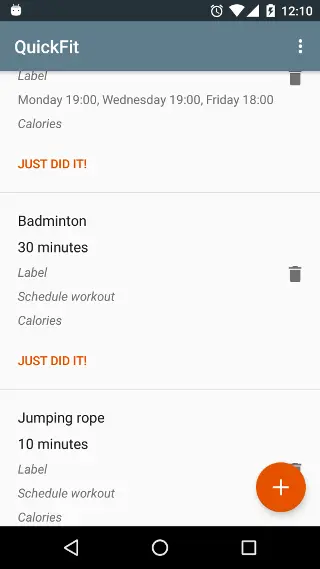
The FAB needs to be able to move out of the way, so that all parts of all list items are actually reachable. Also, it is good form in this situation to have the app bar scroll out of the way, to maximise the viewport area dedicated to the list. There’s a well-known ready-made solution for this; it looks like this

and has two disadvantages:
- it does not visually sync up well with the leaving app bar - in contrast to the scrolling AppBarLayout, the animation is not linked to the actual scrolled distance, and to me, the hiding animation is distracting while I, as a user, am focused on scrolling the list
- it does not sync up with the leaving app bar by implementation - this solution does its listening on nested scroll events and subsequent processing on its own. Together with the snapping behavior of the AppBarLayout, this can lead to states where the app bar is expanded, but the FAB hidden. This does not bode well for confused users having no idea where the FAB has gone.
Here’s how to get the FAB to move in sync with the app bar.
QuickFit 1.2 released
Juliane Lehmann
2016-06-02
QuickFit now features a beautiful wide layout, for use on tablets in landscape mode. See:

A post or two on how to implement this fabulous FAB behavior is to follow.
This release also fixes a bug; scheduled activities do now really get cleared by clicking on the notification and will not reappear together with the next alert.
QuickFit is free on Google Play, or be a beta tester
Find the source (Apache License 2.0) on GitHub
I’d be happy about feedback on reddit, or raise an issue on GitHub.