Posts
Automating play store screenshots for fun and additional testing
 Juliane Lehmann
2016-04-12
Juliane Lehmann
2016-04-12
Taking screenshots for the play store is boring as hell: several locales, three form factors, setting up content data for the screenshots, possibly varying by locale… For the last release of QuickFit, I decided to automate.
xkcd says it was worth it
(xkcd)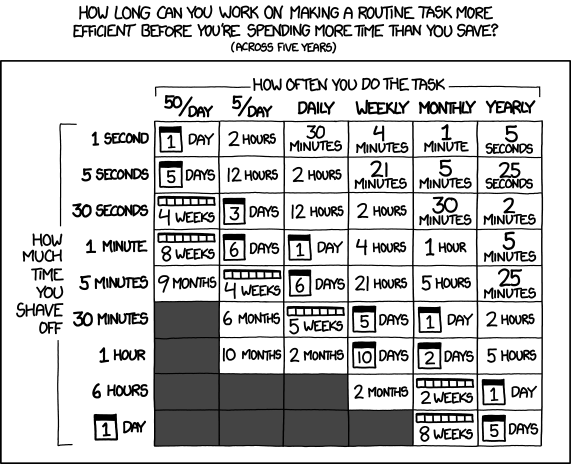
What you get in this post
- a complete step-by-step description
- in a real project
- how to automate taking play store screenshots
- and simultanously increase your test coverage (or get started with some UI tests at all!)
And because UI tests are needed and a happy byproduct of the process, it comes with
- a very short introduction to Espresso
- a very short introduction to UiAutomator
- examples for testing RecyclerViews with Espresso
- examples for setting up test data
I’ll walk you through my journey on automating the screenshots for the QuickFit app. It’s open source, [on github][github-quickfit] and on the [play store][playstore-quickfit]. [github-quickfit]: https://github.com/strooooke/quickfit [playstore-quickfit]: https://play.google.com/store/apps/details?id=com.lambdasoup.quickfit
QuickFit 1.1 released
Juliane Lehmann
2016-04-11
QuickFit now allow scheduling workouts on a weekly repeating basis!
This update is all about taking even more thought and effort out of tracking workouts with Google Fit: Set up once when you plan doing your workouts, and then get reminded via a notification to actually do it, and to enter your session into Google Fit. The focus is still on delivering minimal UI that allows the user to get all needed information as fast as possible.
New app: QuickFit
Juliane Lehmann
2016-02-24
I’m learning Android development, and after hacking on Watchlater for a while, it was time for the first project completely of my own, that should also allow me to try my hand at some framework component that Watchlater simply had no use for. That project lies dormant on my HDD - while it taught me about the support library, material design and all about the service lifecycle, ultimately my goal of writing the IRC client I wanted was doomed from the start. The IRC protocol simply does not allow to identify users persistently, and so my goal of presenting query conversations on the same level as channels was unreachable. So QuickFit is the much better replacement project.
For me, using Google Fit is about logging my activity, looking at the calendar view and seeing a nice, high level and getting my daily pling. So walking and cycling gets tracked nicely automatically, but of course I want to enter my other workouts too. The Google Fit app can do this, but it is a bit of a long process: select the activity from the dropdown (easy, with the favorites), enter a time span, hit submit, get the “activity is in the future” message, go back, decide on some easy-to-enter start time that will work, hit submit again. That should be easier!
There was my perfect excuse for an app that allows me to:
- solve my problem
- try out using the Fit API using the Play Services library
- use some fully featured material design, with pretty RecyclerView and CoordinatorLayout and a FAB
- use Loader, ContentProvider and SyncAdapter
- do some proper persistence with sqlite
- and I have some great plans for the future
Available for free on Google Play, or be a beta tester
Find the source (Apache License 2.0) on GitHub
I’d be happy about feedback by mail, or raise an issue on GitHub.
App update: Watch Later 1.3.1
 Maximilian Hille
2016-01-18
Maximilian Hille
2016-01-18
Watch Later got another update:
- Adds a launcher activity, with explanation, example link for trying out and advice on defaults configuration.
- Adds settings (resetting default youtube account choice).
- Allows setting a default youtube account to always use.
- Deals with changes in YouTube Data API v3 (no more channels returned for accounts without channel).
Available for free on Google Play
Feedback welcome on Reddit
Find the source (GPL) on GitHub
App update: Watch Later 1.2.2
Maximilian Hille
2015-10-22
Watch Later got an update:
- User interface improvements
- User can open added video directly for watching
- Bug fixes
- Support for Android 6.0 Marshmallow
Unfortunately, we did not have time yet to get around Android M’s AppLinks-Anti-Feature. There are some ideas, but no time right now.
Available for free on Google Play
Feedback welcome on Reddit
Find the source (GPL) on GitHub
Android cheatsheet
Maximilian Hille
2015-07-29
I googled the following things so often that I will be lazy and put them on my site for easier retrieval:
Android debug keystore fingerprint
keytool -list -v -keystore ~/.android/debug.keystore -alias androiddebugkey -storepass android -keypass android
Android emulator hardware acceleration
emulator -avd <avd_name> -qemu -m 512 -enable-kvm
Android emulator mock GPS location
adb emu geo fix 121.4961236714487 31.24010934431376
Update: GUI for ibutton
Maximilian Hille
2015-06-04
The recently released Go application for controlling iButtons just got a small update: A GUI interface. It is very basic for now, but, as far as I know, the first graphical iButton interface for Linux.
I did not yet check if the App works from your Ubuntu Touch device, but since it should only depend on the installed kernel modules and working USB-to-go, I will need a physical device to actually test this. Android kernels usually do not carry the necessary drivers…
Building this has been a nice opportunity for me to learn a bit of the upcoming Ubuntu way of doing apps. The Ubuntu SDK uses Qt/QML as frontend language. QML is a specialized JavaScript’esque language for doing MVC. Qt has bindings ready in a lot of languages, but Go being part of the officially supported ones in the SDK (Go, Python, C++) could be a nice go-to app architecture in the future.
That said, the Ubuntu SDK is still at a very early stage. After years of doing Android, Ubuntu’s docs and the IDE (customized QtCreator) seem pretty rough.
You can find the project on GitHub, the license is (like the rest of go-netlink) GPL3+.
Go release: go-netlink
Maximilian Hille
2015-05-05
To read Maxim iButton temperature sensors in Linux is not a big problem, but needs some work. There is a kernel module / driver for the USB reader adapter. This kernel module can be accessed from user space via a special file ‘rw’ or via a Netlink interface.
The ‘rw’ method is straight forward (with the technical docs from Maxim), but has some drawbacks: The file as it is created is only accessible for root and the location of this file is depending on the unique ID, distribution and maybe even the kernel version.
The Netlink method does not have these drawbacks, but in order to use the Netlink interface, you need to learn a bit about the Linux kernel.
After reading more kernel code that I wanted and learning about how to debug a running kernel (thanks for making Systemtap), I managed to talk to the iButton. You can grab the code at GitHub, it’s license is GPL3+.
The Go packages mirror the Netlink / Connector / One-Wire layer hierarchy within the kernel. Thus, the code can also be interesting for people trying to talk with other branches on those subsystems.
Note that the implementation is not very clean yet. I get some warnings like ALLCAPS for constants. I consider myself still a Go rookie ;-)
App release: Watch Later
Maximilian Hille
2015-05-05
Do you also sometimes encounter YouTube links while browsing on the way? Chances are you have the same problem as me: the YouTube app would open and instantly start buffering, consuming precious amounts of mobile data volume.
Do not want to miss the video but watch it later with unlimited internet (eg. at home)? Look no further - I just released a small app called ‘Watch Later’. It registers on YouTube http URLs and can add the video to your YouTube account’s Watch Later list.
Available for free on Google Play
Feedback welcome on Reddit
The App is licensed under GPL, sources available on GitHub
The Second Cloud
Maximilian Hille
2014-10-01
A lot of us fell victim to the sweet poison of cloud services – me included. Services I use on a daily basis include Google Drive, Google Maps, Github and Gmail, just to name a few. Those are comfortable programs. Running in your browser, everywhere, always up-to-date. No need for backups or any maintenance at all.
What is the price of all this?
You are not only accessing data on remote systems, but you can not know what code will run over there. This is actually worse than running proprietary software on your machine, since you lost even the most basic ways of analysing what’s happening.
Also, giving away the control over your data. Most services will tell you that the data is secure there, but do not believe them! They can access the data and will give access to whoever has enough power or money.
What now?
Everyone builds their own server? This is where a lot of still active services originate from. Mail and Websites can be run by yourself, but it certainly not possible for everyone.
The last months and the success of Bitcoin let me to believe that peer-to-peer based services can help. Bitmessage tries to replace Email. There are even more ambitious ones like MaidSafe which have no lesser goal than building an Internet replacement.
These ideas are not entirely new: Freenet is around for more than a decade now. Back in 2000 there were already visionaries who knew that we would have to defend freedom on the Internet.
The currently existing/developing services might not survive the test of time and acceptance, but there are already hundreds of projects, most of these sharing concepts and code. Thus, I am confident that we will be able to replace current cloud services one-by-one with more secure peer-to-peer based alternatives.